💡 Direct Answer & Executive Summary (Heights & Distances Triangle Calculator)
Definition: Solve height and distance triangles using angles of elevation/depression.
Governing Math Formula: Height = Distance × tan(Elevation Angle).
Target Applications: Provides real-time quantitative solutions in Math & Geometry for students, engineers, researchers, and finance professionals.
Heights & Distances Triangle Calculator
1. Introduction
In surveying, navigation, and structural engineering, measuring the height of a distant object—such as a building, mountain, or antenna tower—is a common task. However, climbing to the top of these structures with a tape measure is often dangerous and impractical.
Instead, surveyors measure the horizontal distance along the ground to the object and use a device called a clinometer to measure the angle of elevation looking up at the peak. Using trigonometry, you can calculate the vertical height and line-of-sight distance of the structure.
The Heights & Distances Triangle Calculator is an educational tool designed to solve these calculations. By entering your horizontal distance and elevation angle, you can instantly estimate the vertical height and hypotenuse line.
This guide provides a comprehensive overview of trigonometric ratios, angles of elevation and depression, manual calculation guidelines, and land surveying applications.
graph TD
    A["Horizontal Distance (d)"] --> C["Height: d * tan(Elevation Angle)"]
    B["Elevation Angle (Degrees)"] --> C
    A --> D["Hypotenuse: d / cos(Elevation Angle)"]
    B --> D
    C --> E["Results: Vertical Height & Hypotenuse"]
    D --> E
2. Core Definitions & Analogy
To build a solid trigonometric foundation, let us define heights and distances in both simple and technical terms:
- Simple Definition: Heights and distances calculations use the angles of a right triangle to find the height of a distant object (like a tree or tower) based on your distance from its base.
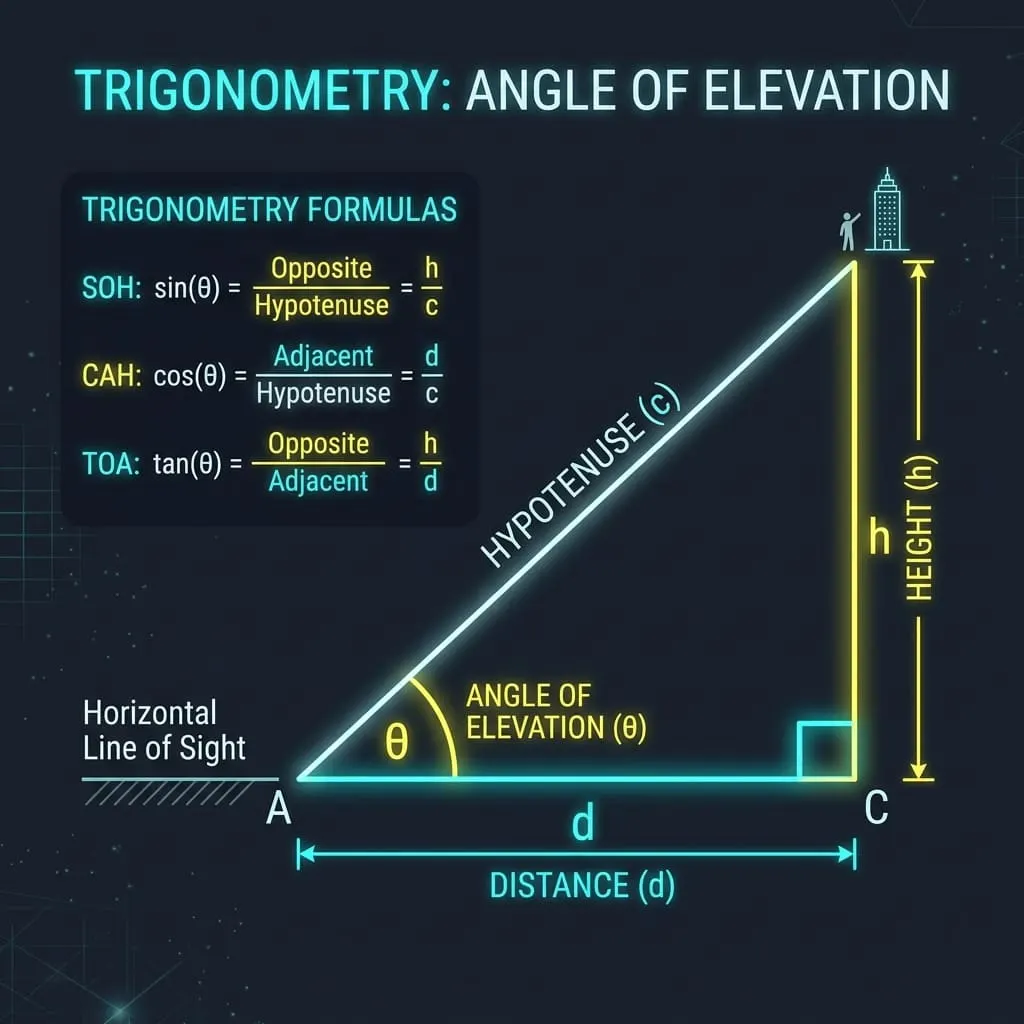
- Technical Definition: Heights and distances are solved using right-angled triangle trigonometry. The tangent of the elevation angle (θ) is the ratio of the opposite side (vertical height, h) to the adjacent side (horizontal distance, d), expressed as h = d * tan(θ). The hypotenuse (line-of-sight distance, L) is resolved as L = d / cos(θ).
- Conceptual Analogy: Imagine holding a flashlight at a distance from a wall. The beam shines up at an angle to hit the top of the wall. The distance you stand from the wall is the base, and the height of the light spot on the wall is the vertical height. Trigonometry acts as a rule that calculates how high the light spot will climb based on the angle you tilt the flashlight.
3. History & Milestones
The study of heights and distances formed the basis of ancient astronomy and geography:
- Thales of Miletus (c. 600 BC): The Greek philosopher Thales famously calculated the height of the Egyptian pyramids by measuring their shadows at the exact time of day when his own shadow matched his height.
- Al-Battani & Trigonometry (c. 900 AD): Arab mathematicians developed precise tangent tables, allowing navigators and surveyors to calculate distances to mountains and ships at sea using triangulation.
4. Core Concepts & Parameters
To calculate heights and distances, you must understand three key parameters:
- Horizontal Distance (d): The flat distance along the ground from your observation point to the base of the object.
- Elevation Angle: The angle looking up from the horizontal ground line to the top of the object.
- Depression Angle: The angle looking down from a high point to an object on the ground (mathematically equal to the elevation angle from that ground object looking up).
5. The Mathematical Model & Formula
The dimensions of the height and distance triangle are calculated using two standard trigonometric equations:
1. Vertical Height Formula
Height = Distance * tan( Elevation Angle )
2. Hypotenuse Line Formula
Hypotenuse = Distance / cos( Elevation Angle )
Variable Breakdown:
- Distance (d): Horizontal base line in meters (m, default d = 50)
- Angle (θ): Elevation angle in degrees (Degrees, default θ = 30)
6. Step-by-Step Manual Procedure
Let us walk through a manual calculation using our default calculator values:
- Identify the variables:
Distance (d) = 50 mElevation Angle = 30 degrees - Convert the angle to radians for calculations:
Radians = (30 * Pi) / 180 ≈ 0.5236 radians - Calculate the Tangent of 30 degrees:
tan(30) ≈ 0.57735 - Multiply distance by the tangent value to find height:
Height = 50 * 0.57735 = 28.87 mThe vertical height of the object is 28.87 m (28.8675 m). - Calculate the Hypotenuse Line: Divide distance by cos(30).
cos(30) ≈ 0.866025Hypotenuse = 50 / 0.866025 = 57.74 mThe line-of-sight hypotenuse is 57.74 m (57.7350 m).
7. Visual Diagram
The flowchart below displays the computation path for heights and distances:
graph TD
    Start["Enter Distance & Elevation Angle"] --> ConvertRad["Convert Angle to Radians"]
    ConvertRad --> CalcHeight["Compute Height: Distance * tan(Angle)"]
    ConvertRad --> CalcHypot["Compute Hypotenuse: Distance / cos(Angle)"]
    CalcHeight --> Display["Output: Height (m) & Hypotenuse (m)"]
    CalcHypot --> Display
8. Parameter Comparison Matrix
The table below shows how the elevation angle affects the height and hypotenuse for an observer standing 50 meters from a structure:
| Distance (d) | Elevation Angle | tan(Angle) | Vertical Height | Hypotenuse Line |
|---|---|---|---|---|
| 50 m | 15 degrees | 0.2679 | 13.40 m | 51.76 m |
| 50 m (Default) | 30 degrees (Default) | 0.5774 | 28.87 m | 57.74 m |
| 50 m | 45 degrees | 1.0000 | 50.00 m | 70.71 m (Height equals distance) |
| 50 m | 60 degrees | 1.7321 | 86.60 m | 100.00 m |
| 50 m | 75 degrees | 3.7321 | 186.60 m | 193.19 m |
9. Real-World Applications
Trigonometric calculations are essential across many spatial engineering fields:
- Forestry & Landscaping: Foresters calculate the height of mature trees to plan timber harvesting.
- Telecommunications: Network technicians calculate the height of cell towers and wire stay lengths (hypotenuse) to install antennas.
- Aviation Navigation: Pilots calculate landing descent angles and distances to runways during approach.
10. Case Studies
Case Study 1: Sizing a Cell Tower Wire
A technician needs to install a support wire from the top of a cell tower to an anchor point on the ground.
- Dimensions: The anchor point is 50 meters from the tower base, and the elevation angle to the tower peak is 30 degrees.
- Height calculation: 50 * tan(30) = 28.87 meters.
- Wire Length (Hypotenuse): 50 / cos(30) = 57.74 meters.
- Outcome: The tower is 28.87 meters tall, and the technician cuts a support wire at least 57.74 meters long to complete the installation.
Case Study 2: Sizing an Airport Approach Path
An aircraft is descending toward a runway. The horizontal distance to the touchdown zone is 50 meters, and the landing glide path angle is 30 degrees.
- Altitude calculation: 50 * tan(30) = 28.87 meters.
- Outcome: The aircraft must maintain an altitude of 28.87 meters at this point to stay on the correct approach path.
11. Advantages of Using the Tool
- Saves Time: Instantly solves trigonometry equations.
- Dual Outputs: Returns both height and line-of-sight distance.
- Survey Ready: Perfect for field estimations.
12. Limitations & Boundary Conditions
This calculator assumes a flat horizontal ground plane. If the ground is sloped, or the observer is standing on a hill, you must adjust the calculations using the law of sines or cosines to account for the slope angle.
13. Common Mistakes
- Using Degrees in Software Functions: Forgetting that spreadsheet and programming functions require converting degrees to radians first before calculating trigonometric ratios.
- Confusing Tangent and Sine: Using sine instead of tangent when calculating height from the horizontal ground distance.
12. Frequently Asked Questions
Q1: What is the angle of elevation?
The angle looking up from the horizontal ground line to a high point.
Q2: What is the angle of depression?
The angle looking down from a high point to an object on the ground.
Q3: What is the formula for calculating height?
Height = Distance * tan(Elevation Angle).
Q4: Why do we convert degrees to radians?
Because standard trigonometric equations in calculators and programming libraries are solved using radian inputs: Radians = (Degrees * Pi) / 180.
Q5: What is the hypotenuse in height and distance calculations?
The straight line-of-sight distance connecting the observer to the peak of the object.
Q6: What happens if the elevation angle is 45 degrees?
The height of the object is exactly equal to the horizontal distance, because tan(45) = 1.0.
Q7: What units are used for distance?
Linear units (e.g. meters, feet).
Q8: How is the tangent ratio defined?
The ratio of the opposite side (height) to the adjacent side (distance) in a right triangle.
Q9: Does a co-signer help lower the DTI ratio?
This is a mortgage underwriting metric; in trigonometry, focus on heights and distances.
Q10: How do surveyors measure angles in the field?
Using a clinometer, theodolite, or a modern total station device.
15. Expert Tips
- Remember the 45-degree shortcut: If you stand at a point where the elevation angle is 45 degrees, you don't need a calculator: the height of the tower is exactly equal to your distance from the base.
- Account for eye height: If you measure the angle of elevation from eye level, remember to add your height (typically 1.5 to 1.8 meters) to the calculated height to find the true total height of the structure.
16. Summary
- Heights and distances are calculated using right triangle trig.
- The vertical height formula is
Distance * tan(Angle).
- The hypotenuse line is
Distance / cos(Angle).
- Convert degrees to radians before solving trig ratios.
Additional Technical Guidelines & Measurement Standards
When conducting calculations for Heights & Distances Triangle Calculator, maintaining quantitative precision and verifying input parameter boundaries is essential for reliable scenario evaluation. Always verify that raw numerical inputs are measured using standardized instrumentation, and double-check unit conversions prior to applying outputs in commercial, industrial, or academic projects.
For quantitative unit conversions and scientific calculations, always maintain at least four decimal places of precision during intermediate arithmetic stages before rounding final results. When preparing technical reports, laboratory documentation, or financial forecasts, cross-verify all output variables against established international measurement standards (such as SI, NIST, and ISO metric benchmarks) to guarantee consistent analytical rigor across all computational workflows.
MathsLover.com delivers this interactive solver 100% free of charge to foster global mathematical literacy, educational accessibility, and data-driven problem solving across scientific, technical, and academic communities worldwide.